8 Best Rumpelstiltskin AI Video Tools for 2026: Photos, Motion, and Editing
 Rumpelstiltskin AI
Compare eight ways to cast photos, direct a performance, and edit a Rumpelstiltskin AI video.
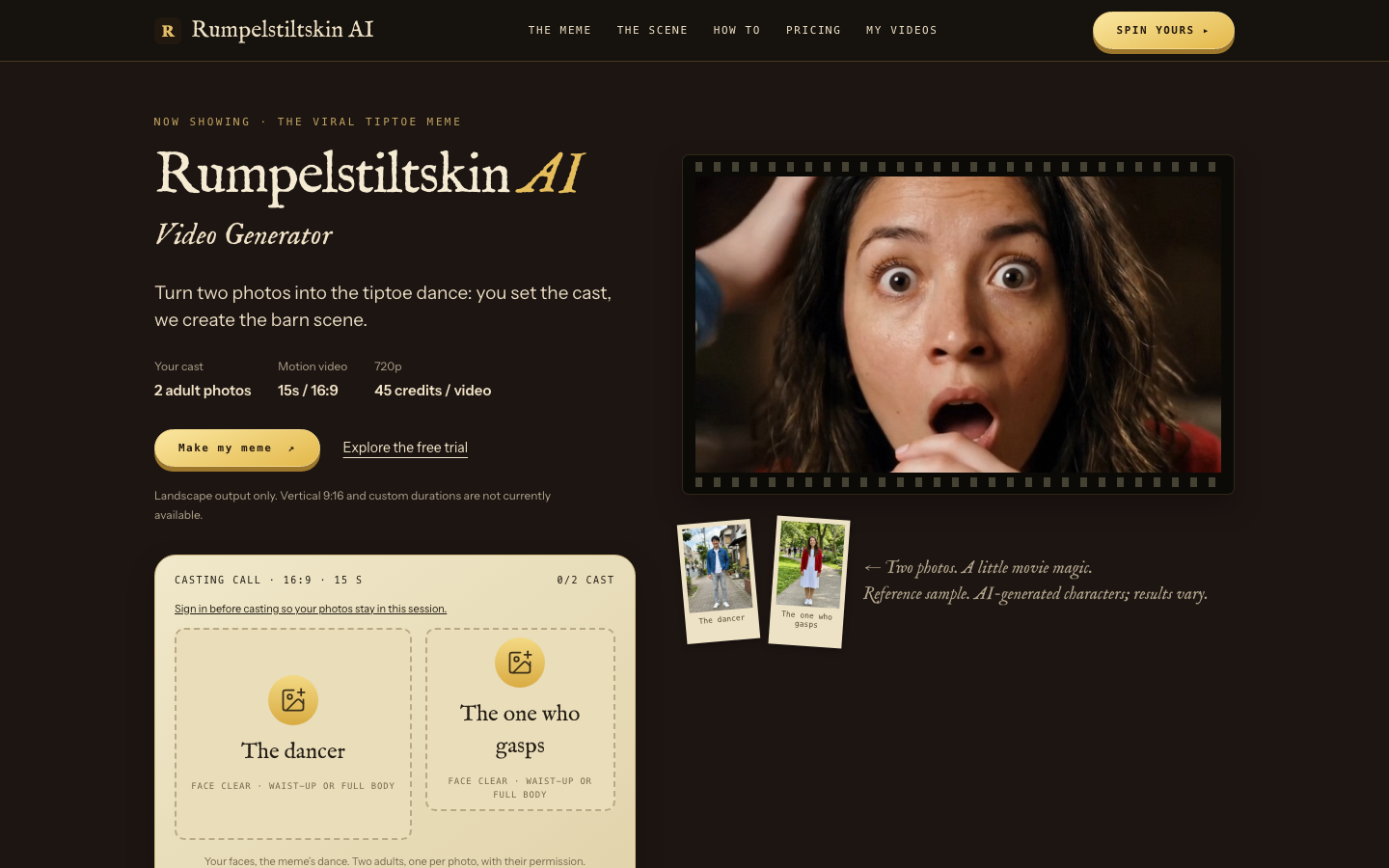
Want to cast yourself in the tiptoe barn meme, direct a new performance, or finish a remix for social media? These eight tools cover different parts of the job. Some turn photos into a ready-made scene. Others transfer movement to a character or help you edit a clip you already have. The right choice depends on what you can provide and how much control you need.
The screenshot above shows Rumpelstiltskin AI in October 2026. The sample is illustrative; each generated result can differ.
Choose Your Rumpelstiltskin Video Workflow
| Tool | Best for | Inputs to prepare | Output workflow | Cost basis |
|---|---|---|---|---|
| Rumpelstiltskin AI | Casting two people in a prepared barn scene | Two clear photos of consenting adults | 6-, 13- or 15-second, landscape or portrait motion video; 480p, 720p, or 1080p | One-time packs from $9.90; 20, 45, or 80 credits per video |
| RapVideo AI | Casting two people, including from a shared photo | Two portraits or one photo with both people | Prepared two-person effect with format and quality choices | One-time packs or subscription |
| AIGenTools | Casting a selected role and making a vertical variation | A photo for each role you replace | Short effect with duration and aspect-ratio options | Subscription credits; check the effect's quote |
| Kling AI | Giving one character a specific reference dance | Character image and continuous movement video | Motion-transfer shot for a custom edit | Credits charged by length and mode |
| Runway | Performing the shush, grin, or reaction yourself | Driving video and character image or video | Performance transfer, then scene assembly | Subscription and per-second credits |
| Pika | Animating a photo character with movement | Character photo and motion reference | Motion-transfer clip | Plan or credit-pack pricing |
| Luma | Restyling a performance already filmed | Source video and visual direction | Video-to-video transformation | Subscription credits; settings affect usage |
| CapCut | Finishing a clip for posting | Generated or filmed footage | Composite, caption, soundtrack, and export | Free options; some features require Pro |
Start with a photo-casting tool when you want to appear in the recognizable meme quickly. Use a performance tool when your own choreography, character, or setting matters more than matching the familiar scene. Finish in an editor when the footage already exists.
Tools for Photo Casting and Custom Performances
Rumpelstiltskin AI
Rumpelstiltskin AI at airumpelstiltskinmeme.com is the direct photo-casting option in this list. Its barn preset takes two photos: one person plays the tiptoe dancer and the other plays the surprised reactor. Each photo should show one consenting adult clearly. After signing in, choose 480p, 720p, or 1080p, confirm permission to use both photos, and submit the generation.
The intended result is a 6-, 13- or 15-second, landscape or portrait motion video inspired by the familiar beats: a quiet entrance, a finger-to-lips “shhh,” an exaggerated grin, the reaction, and the dance through the straw. These are creative directions, not guaranteed shot-for-shot frames. The AI may vary likeness, motion, and timing. Choose 16:9 landscape or 9:16 portrait and a duration of 6, 13 or 15 seconds before generating.
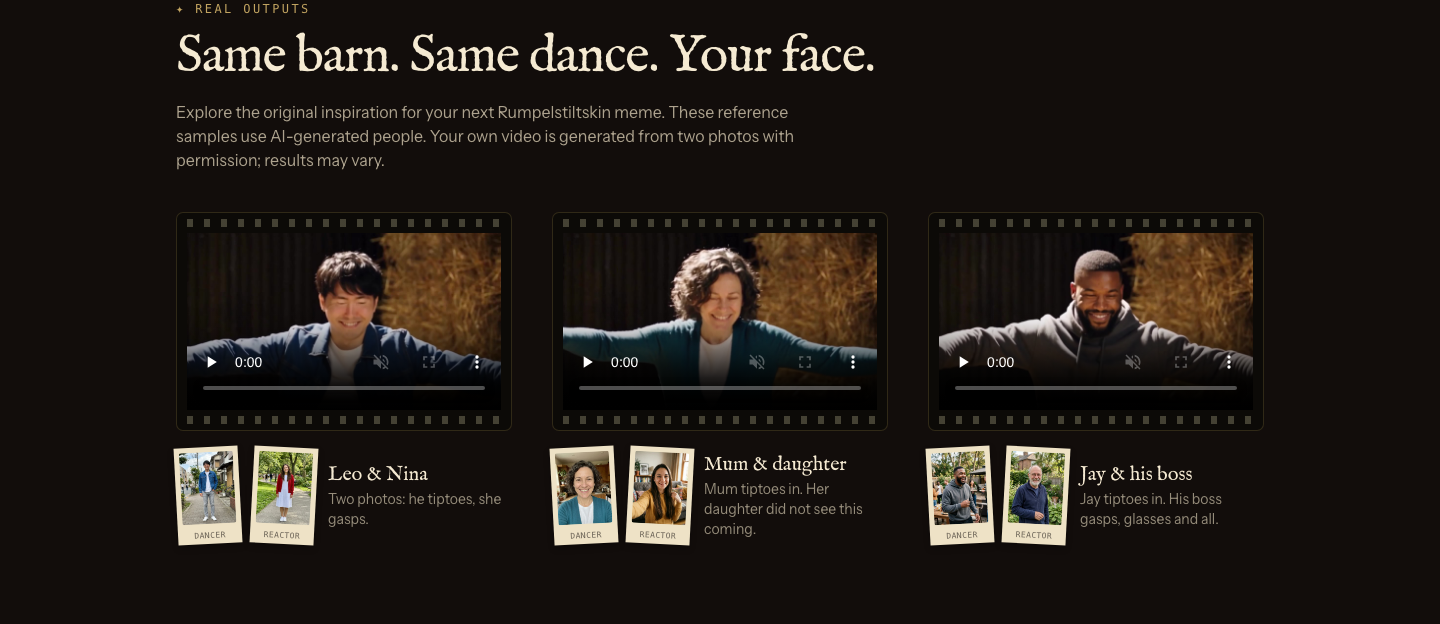
Screenshot: reference examples on the Rumpelstiltskin AI site. They show the intended mood, not a promise of identical results.
A 480p generation costs 20 credits, 720p costs 45 credits, and 1080p costs 80 credits. One-time packs are $9.90 for 50 credits, $19.90 for 105 credits, and $29.90 for 160 credits, with no recurring subscription. The full pack price is paid up front. Purchased credits do not expire; a confirmed failed generation returns its reserved credits. The site shows the credit cost before submission.
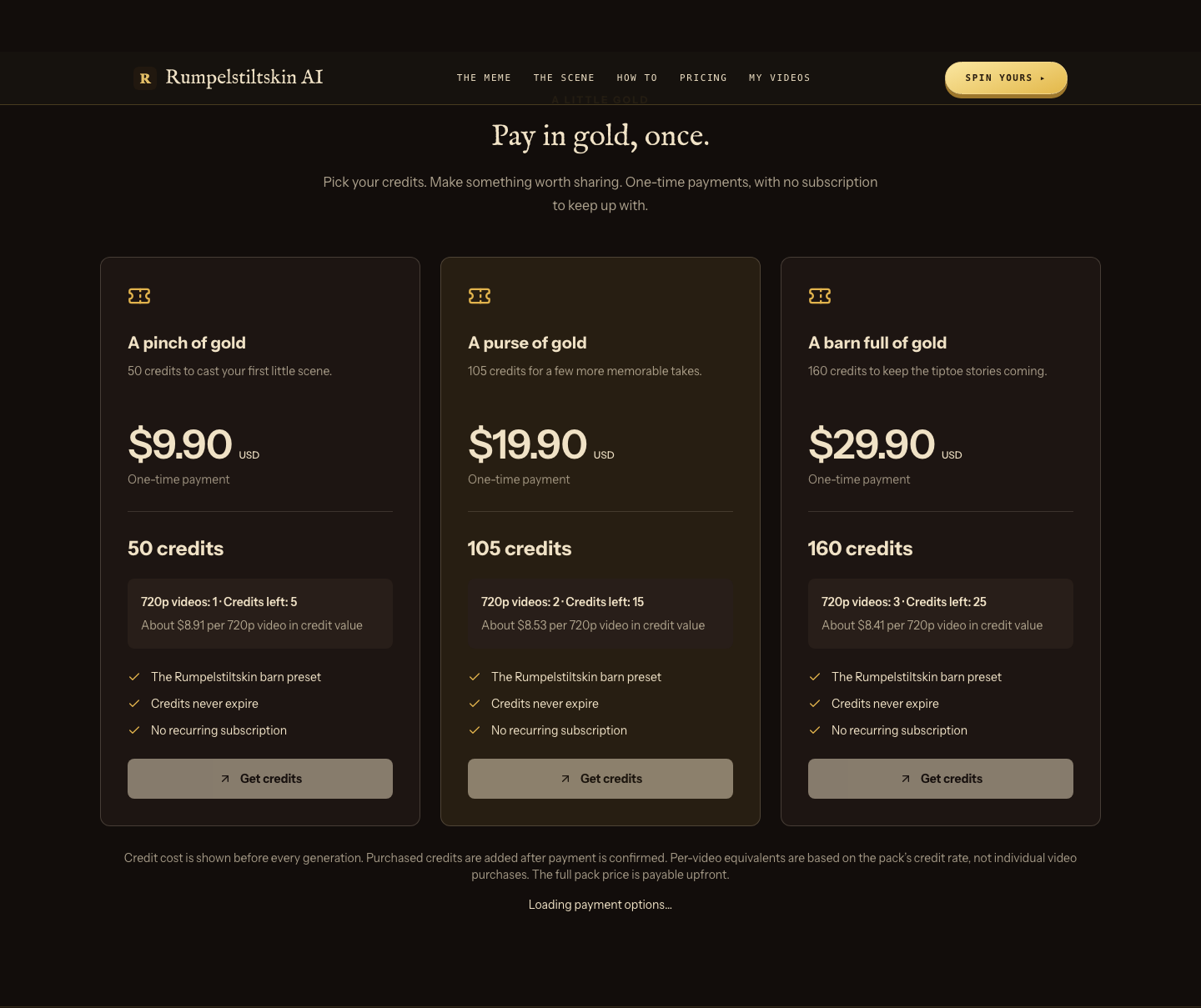
Screenshot: the site's credit-pack pricing. Check the live checkout for the payment options available to you.
There is also a free still-video trial, subject to availability. It uses two photos to create an AI scene image and exports a 10-second, 480p video in which the people do not move. It is a way to preview the visual setting, not a free version of the paid motion generator. For the familiar trend soundtrack, the barn preset is silent by default; add music from the licensed library of the platform where you post.
Choose this tool when the recognizable two-person barn sequence is the point of the joke and you want a ready-made starting point. Open Rumpelstiltskin AI.
RapVideo AI
RapVideo AI is another prepared-effect route for the dancer and the onlooker. It accepts separate portraits or a shared picture of both people, which can be convenient when the joke starts with a photo you already have. Its effect handles the scene and offers controls for the selected format and quality. Check the settings and credit quote before generating: changing resolution or length can change the cost.
Choose RapVideo AI when the shared-photo input is the deciding feature. If you already have one clear portrait per person and want the 15-second barn preset, compare it with the first tool's two-photo workflow.
AIGenTools
AIGenTools is useful when you want to replace the dancer, the spectator, or both, and when a vertical version matters to your post. Prepare one image for each role you cast, then select the effect's available duration and aspect ratio. The result follows the chosen scene rather than a choreography you direct beat by beat.
Choose it for role selection or a portrait-format take. Review the effect's live credit quote and output settings before committing, especially if you need a particular resolution or clip length.
Direct Your Own Character and Performance
The next four tools start from a different question: what should the character do? They are better suited to a new dance, a different look, or a scene that goes beyond the prepared barn template. Expect to supply a clean reference performance and to do more editing afterward.
Kling AI
Kling AI's motion-control workflow uses a character image and a reference video of the movement you want. For a tiptoe-inspired clip, create or choose the character's look first, then record a continuous dance reference with a clear body pose. Generate that shot and build any reaction or close-up shots separately.
Choose Kling when the movement itself is the creative brief. A reference clip containing multiple hard cuts is harder to use as one continuous action; isolate the beat you want to transfer. Pricing depends on the model, mode, and seconds generated, so calculate the cost for the selected settings.
Runway
Runway's Act-Two approach starts with your driving performance and a character image or video. Act out a shush, a grin, or a startled reaction, then transfer that expression and movement to the character. This is useful when the joke depends on your timing rather than a fixed template's timing.
Choose Runway when you want to perform the expressive moment yourself. Treat each shot as its own take and assemble the final sequence afterward. Access requires an eligible paid plan, and generation uses credits according to clip length.
Pika
Pika's motion-transfer route pairs a character photo with a movement clip. It suits a short dance beat where the character's appearance comes from an image and the movement comes from a reference performance. Prepare a source clip with the action you actually want, then inspect the app's current generation cost and sound options before rendering.
Choose Pika when the job is photo plus movement reference. If you need a sequence of reaction shots and a closing dance, plan to create and edit those beats rather than expecting one transfer to supply the entire meme.
Luma
Luma's video-to-video tools are for changing footage you already shot. Film your own tiptoe performance, then direct a different costume, environment, or visual treatment around it. The source video's framing and motion become the foundation, so a clear, well-lit performance will give the transformation a more usable starting point.
Choose Luma when you want to restyle your own footage instead of casting photos into a prepared scene. It is a custom production path, not a dedicated Rumpelstiltskin preset. Confirm the current model's duration, resolution, and credit rate before generating.
Finish the Meme for Sharing
CapCut
CapCut is the finishing tool once you have a generated or filmed clip. Use its timeline to trim the entrance, place the reaction on the right beat, add captions, and frame a horizontal video for a vertical post. If you filmed a subject against a solid-color background, chroma key can place that subject in another scene. Preview the entire sequence before exporting so the shush, reveal, and dance land in order.
Choose CapCut when the footage is ready but the post is not. Its editor does not perform the two-photo casting step; it helps you turn a finished take into a shareable edit. Some tools are free, while Pro assets and features have separate pricing.
A Practical Path from Photo to Post
- Decide who is in the scene. For the prepared two-person meme, get one clear JPG, PNG, or WebP photo of each consenting adult. Do not use unauthorized faces, minors, or public figures in the Rumpelstiltskin AI casting workflow.
- Choose the production route. Use Rumpelstiltskin AI for its ready-made 6-, 13- or 15-second barn scene, a motion-control tool for your own dance, or video-to-video if you have already filmed the action.
- Budget for a usable take. Compare the displayed credit cost with the number of attempts you may need. For the Rumpelstiltskin AI preset, 720p uses 45 credits; its $9.90 pack supplies 50 credits. Generation time and results can vary.
- Review the output. Look at both faces, the sequence of actions, framing, and any unexpected details. A reference image guides the AI but does not guarantee exact identity or a fixed shot order.
- Finish and disclose. Download the MP4 before its result link expires. Add music through the posting platform's licensed sound library if you want the trend's song, and follow the platform's AI-content labeling rules.
For the quickest route to a two-person version of the barn meme, start with the Rumpelstiltskin AI video generator. For a new performance, build the character and motion in a dedicated generation tool, then use an editor to make the final timing work.